mo.notono.us

Thursday, October 03, 2013

Move along, nothing to see here...

Move along to @austegard on Twitter.

Who has time for more than 140 characters these days?

Labels: , , , , , ,

Friday, April 12, 2013

An experiment in social conscience and greed


A couple weeks ago, one of my coworkers found a dollar bill on the floor, and not knowing whose it was put it on my stand-up desk (aka the file cabinet next to my desk). It sat there for a couple of days, eliciting questions, but no action.

After a week, mysteriously the dollar had gained some friends in the form of five pennies, two nickels, a Chuck-e-cheese token, and a highly dubious coin simply decorated with laurels and a $, and made from cheap plastic. Then another coworker lost a bet and added the $1 pot to the ...uhm.. pot.

Last week an origami dollar bird appeared.


Current total value: $3.15, plus a game of skee ball. All sitting out in the open, ready for the taking. Yet, no.


Update 04/17
The money is gone. Budget-constraints in the snack department caused a reallocation of funding to Mama Zuma and her followers. Instantly additional funding magically appeared; the money is now gone. I blame hunger and masochistic tendencies (if you've tasted Mama's chips you'll know what I mean) more so than greed.

Labels: ,

Wednesday, March 27, 2013

Thomas Jefferson on the permanence of laws

Today is a good day to reflect on the permanence of laws, and whether they do require changing, as society changes:


Composed from A letter from Thomas Jefferson to Samuel Kercheval, July 12, 1816, The Jefferson Papers, Library of Congress

Labels: , ,

Friday, January 25, 2013

New Venture

Two weeks ago was my last day at Applied Information Sciences (aka Applied IS aka AIS). It had been a great experience, almost six and a half years(!), but I had known for a while that it was time for a change: I wanted to move out of consulting, and to a larger non-IT company, but (like at AIS) a company where IT was still seen as a major strategic asset.

So when I received a call from one of Gannett's recruiters, I was immediately interested. As luck would have it the feeling was mutual, and I am now a Development Manager for Gannett Digital, focusing on their core API. As one of the world's largest media companies with a strong focus on digital media, Gannett is a great corporate fit, and the current job description suits my background quite well (though I still harbor a not so secret aspiration to move towards the UX side at some point).

After two weeks of drinking from the proverbial firehose I am finally starting to find my sealegs, and moving the ball forward (decided to go three for three in the cliché department) - or at least so I think...

Labels: ,

Monday, October 22, 2012

A Tour of Gerrymanderland

Welcome to the Baltimore Beltway Bus Bonanza!

For the next hour, traffic permitting, we're going to take you on a 49 mile loop loop around Baltimore, and across 4 of our 8 great Maryland Congressional Districts. Here's a map, with the points of interest along the way. This bus is equipped with seatbelts, so fasten them up, and pull out your map and the congressional bingo sheets and keep score as we drive.

View Larger Map

Right now, to get us started, we're at A, the exit ramp on I-695 for I-95 south, north west of Baltimore. We're gonna drive clockwise around town, and since 695 doesn't actually make a loop, we'll do as best we can and start by going south on I-95. You with me?  Please sit back and enjoy the view.

Alright. We're starting in MD District 2, represented in the US Congress by Rep. Dutch Ruppersberger [D]

... 5 minutes later

Ok folks, the split for 895 is coming up here at B, we're gonna stick with 95.

... 1 minute later

Hey - there's C, Rt 40, and - MD District 3. District 3, whose congressman is Rep. John Sarbanes [D] borders district 2, that makes sense of course.

... 1 minute later

Just crossing Rolling Mill Rd now at D, back in District 2...

... 3 minutes later

Hey look below, 895 joining us again and Poncast St coming up at E - back in District 3 everyone.

... 5 minutes later

Now, under the tunnel we go, and look, there's F, the 395 interchange heading into the city - and - hey, we're in District 2 again... Ain't it fun?

Wait no, we're already at G and now we're in District 3 again. Hm. They must have drawn districts 2 and 3 so that 95 wove them together or something.

... 3 minutes later

Alright, H: I-695 is coming up, we're heading north.

... 1 minute later

We're now at I, passing Rt 1 and leaving MD District 3, entering District 7, home to Rep. Elijah Cummings [D]. If you need to use the facilities in the back of the bus, this is the time to do so, this is the longest break we'll have on this trip and you don't want to miss anything, now do ya! You know, I've always thought District 7's shape kinda looks like a small dog with a large head yipping at the mailman. You see it?

... 10 minutes later

Alright, wake up folks. Millford Mill Rd comin' up here at J, - you know it's funny - we're still in District 7 - but folks - those living both east and west of us are both in our old friend District 2. But don't worry, we'll get you out of District 7 soon.

... 50 seconds later

Here we go - K, passing by the I-795 exit ramp, we're gonna stick with 695 for the rest of our trip, but hey, at least we're back in our home district, District 2.

... 1 minute later

Wait - sorry, (L) the I-795 entrance ramp is joining us on the right, and we're now in District 3 again.

... 6 minutes later

We're now at M on your map, folks. The people joining us on the right here, they are coming out of Baltimore on I-83. If you look to the left you'll see District 2, but on this side of the freeway we're still in District 3. But have patience, we'll join them soon.

... 2 minutes later

Sure enough, we're at N, and here on the right are the folks joining us from I-83 southbound, leaving District 1, 2, or 7 - who knows which district they came from up there - wave hello, and hello to District 2.

... 2 minutes later

We're now passing Rt 146, Dulaney Valley Rd, O on our map. The area immediately to the left (or North) of the road is Hampton - those folks are in District 1, represented by Rep. Andy Harris [R]. District 1, by the way, is MD's largest district, area wise, and stretches all the way south and across the Potomac down to Ocean City and beyond.

... 4 minutes later

P for Perring Parkway, Rt 41, coming up, We're now in District 3 again.

... 4 minutes later

And here we are at Q. We're all the way home again, passing Lillian Holt Drive, we reenter District 2.

Thanks for joining us, it's been a blast - in and out of 4 congressional districts 12 times in only 50 minutes - that's gotta be some kind of record, huh folks?

Don't tell poor Rep. Andy Harris [R] of District 1, though - it takes him 5 hours and 20 minutes to just to drive from one end of his district to the other, staying within his district:


View Larger Map

And don't even get Rep. John Sarbanes [D] of District 3 started on the cost of gas, he has to spend an entire work day crisscrossing central Maryland to get to his constituents:

View Larger Map

Thanks again, folks - Don't forget to leave a tip for your poor congressman and state delegate, if you can figure out who they are, and be sure to thank them for creating such an interesting form of democracy in our fair state - your souvenir map is available at http://planning.maryland.gov/Redistricting/redistrictingIMap.shtml.

Oh, and before I forget:

Vote No on Question 5 on election day

More:

Baltimore Sun Editorial, October 21, 2012: Against Question 5 


From http://www.elections.state.md.us/elections/2012/ballot_questions.html:


Question 5 - Congressional Districting Plan

Labels: , , ,

Thursday, October 11, 2012

Recent Items in Windows 8

I  just got Windows 8 installed on my work desktop a few days back, and am still trying to find my way around the place.  The jury is still out if this is a great OS for non-touch laptop/desktop users; I really appreciate some of the performance features; some of the UX, not so much.

This morning I was looking for a file I had just closed, and I couldn't remember the filename or the path.  Recent Items to the rescue, I thought. So I hit Windows, typed "Recent" - nothing - continued, "Recent Items" - nothing.  Hmm.  Hit Windows + F to do a file search only - still nada.

Google to the rescue, as always:

From elessarGObonzo: the folder is still located in "C:\Users\[yourusername]\AppData\Roaming\Microsoft\Windows" as 'Recent Items'

Unfortunately this folder is a special folder that can't simply be added as a Toolbar - that would have been great.  You can however add it to your Start menu, Desktop, and also to the Taskbar.

To add Recent items to your Start menu, simply right-click and select Pin to Start.  Done. (Tip: Hit Windows to bring up Start and then move the icon to a place you can find it.)

To add Recent Items to the Desktop is also easy, rght-click, select Send To > Desktop (create shortcut).  Done.

To add Recent Items to the Taskbar is more complex - you have to add a shortcut to the Taskbar folder, which like the Recent Items folder itself is hidden.

From Windows 7 Themes: the Taskbar folder is located here: C:\Users\[yourusername]\AppData\Roaming\Microsoft\Internet Explorer\Quick Launch\User Pinned\TaskBar

So simply Alt-drag the Recent Items from its folder to the Taskbar folder and you now have a button in the Desktop taskbar.

Not quite the same as Windows 7, but manageable.

Labels: , ,

Thursday, May 10, 2012

Lunch-time fun with QR codes

I'm a happy grouch

Starting with a B/W Oscar the Grouch image, and running it through the QArt Coder, got me here http://research.swtch.com/qr/show/e27c9ec04e3013fe - Paint.net took me the rest of the way...

Read about how this works at http://research.swtch.com/qart

Labels: , , , ,

Wednesday, April 04, 2012

I <3 IE8

No, not really. 

On our recently completed Vogue Archive project, IE8 support was a requirement, due to a large number of potential users being stuck at the office on Windows XP with no freedom to install a better browser.  (We had a similar requirement for Firefox 3.6 support, but nowhere near the same kind of trouble with that browser though it was definitely the second worst browser in our field).

Background

The Vogue archive is an HTML5* + Silverlight application: we have two viewers, one built in HTML5 (for tablets and desktop browsers that support it), one built in Silverlight (for all desktop browsers). Both viewers are housed within the same HTML5 "chrome" - see yellow sections in the image below:

Html5Chrome

IE8, of course, was released years before HTML5 started its meandering way through the standardization process, so it should hardly be expected that IE8 should support HTML5.

Mmm, Cookies!

It should be expected, however, that IE8 could support HTTP cookies properly.

Not so much.

We got an error report from the field that when IE8 users logged out from the archive, and then logged back again, the logon process went through, and then promptly redirected them back to the unsecured welcome page at the start of the logon process. Hm.  Sure enough it did.  The excellent error report also stated that for some reason they were seeing two authentication cookies, one of which was empty.  Could that have something to do with it?  Huh? 

[Quite some time later]

The problem was indeed related to the double-cookies, but it appears it was actually caused by how IE8 interprets cookie expiration dates:

The standard way to delete a cookie is to create a new cookie with the same name, in the same domain (and path), with an expiration date set to a date in the past.  A pretty standard date to use is the 'epoch' start date (JavaScript's beginning of time) - midnight of 1/1/1970, GMT, represented as "Thu, 01-Jan-70 00:00:01 GMT;"

For whatever reason, IE8 sees this date, and attempts to convert it to local time - in our case (EDT) 4hrs earlier: 12-31-69 08:00:01 PM.  Slight problem - since '69 was before the start of the epoch, this is then further interpreted as meaning 2069 (never mind the second bug that a winter time should be converted using EST - aka GMT-5hrs).  So rather than creating a new cookie that immediately expired and thus was deleted, we ended up with a new very long-lived cookie.

To complicate things further, as a brute force way for us to make sure we delete both local and domain cookies (we don't know the preference of the client), in our delete-cookie script we actually create two expired cookies, one for each domain (i.e. vogue.com and archive.vogue.com).  It appears the login/logout process got confused and sometimes read one cookie (empty, expiring in 2069) and sometimes the other (valid session cookie).

Solution

While the analysis was complex, the solution was simple - we now use an expiration date of 1/1/2000 rather than 1/1/1970 - now IE can convert times all it wants, and it still stays a date in the past, and the cookie is expired.

Tell Them Again

I <3 IE8.

Labels: , , , ,

Friday, March 30, 2012

idea: bookmarklet to persist personal form data in localStorage

As a developer, I frequently have to clear my browsers cache, and also cookies, in order to test a site.  This is a PITA as now I'm logged out from Google, PivotalTracker, etc, etc.

It also showcases how very few sites store login information in localStorage by default (note to devs, if you're to offer a "Remember Me" button, use localStorage, not a cookie). 

So my idea is this: a set of two bookmarklets: the first would retrieve any form data entered in a form (prior to you submitting it) and store that data in localStorage, then the second would fill out a form using the data stored in localStorage for that site.

What about security you might ask?  Well, clearly this should only be used on a personal computer - and maybe password fields should be excluded in any case.  But this is stored locally, it is not transmitted anywhere, and the data is not accessible to any other site, so the data should stay between you and your computer.  One exception would be any potentially malicious script hosted on the site, but that seems like a risk in itself - the same script could much more effectively simply grab the form data on entry.

So - good idea or bad?

Labels: , , , , ,

Tuesday, February 14, 2012

Rolling Stone Federated Search

RollingStone.com just deployed a new federated search feature, showing top results from the Rolling Stone Archive along with the regular site search.

My team member David Benson created the search service used in the federated search, a stand-alone Archive search page, and all the necessary glue to automatically direct users back to the intended content after authenticating.

The end result is a great way to tie the archive deeper into the Rolling Stone site, and to provide historical context to a user’s search:

image

When clicking on an archive link, if not authenticated, you are presented with an upsell/login page.

Once signed in you are then shown the article you clicked on:

image

Or if you clicked the View All items link, the full archive search, with facet filters and sorting options:

image

Enjoy!

Labels: , , , , ,

Friday, January 27, 2012

Vogue Archive On CBS Sunday Morning

Since we built it, and it's not every day our products appear on national TV here is the obligatory self-congratulating video embed. Enjoy.

from CBS News: Vogue puts its 120-year history online

Monday, December 12, 2011

I’m turning Japanese, I think I’m turning Japanese, I really think so...

To all Japanese/Chinese/Koreans readers out there, my apologies: I have no idea what language this is that Chrome is using. But the song came to mind, and thus the title. The bigger question is: why on earth is this error coming up like this?

image

Labels: , , , ,

Wednesday, November 16, 2011

A non-trendy way to wrap text to the width of an image

Say you have an image, whose width is unknown.  You want to display a caption below the image, and the length of the caption text is also unknown.  How do you display the caption so that the text wraps to the width of the image?

As far as I know, there is no way to do this with divs and Css.  It *may* be possible to do it with figures and figcaptions, but now you’re in Html5 land, and to support older browsers you’ll need to do gymnastics.

You could use an img load event handler and resize the caption after the image comes in, but now you have to add javascript for something that should be handled by your html.

So you use tables.  Yes tables, those horrible, horrible remnants of Web 1.0.

And you do it like this (though your styles would obviously be in a css stylesheet somewhere):

<table>
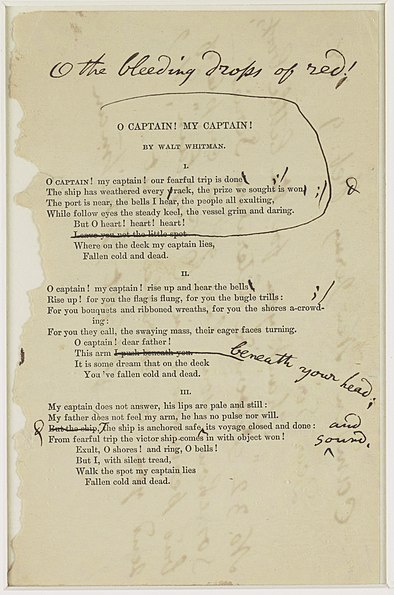
<caption style="caption-side: bottom; margin: 0 5px;">Oh caption, my caption! our fearful task is done!<br>
The layout has weathered every wrack, the prize we sought is won</caption>
<tr><td><img alt="some unknown sized image" src="http://upload.wikimedia.org/wikipedia/commons/thumb/1/14/Ocaptain.jpg/394px-Ocaptain.jpg">
&/lt;tr></table>

which renders thusly (Live writer may corrupt this - sorry view-sourcers):

Oh caption, my caption! our fearful task is done!
The layout has weathered every wrack, the prize we sought is won
some unknown sized image

Also see http://jsfiddle.net/austegard/fGwve/

Labels: , , ,

Tuesday, September 13, 2011

Getting the schema of a dataset from a webservice

I found the following in my Blogger Drafts folder from two-thousand-and-freaking-five.  Since I had completely forgotten about this and never published it, I figured I'd do so now...

1/20/2005:
In a comment to : Evil = WebService DataSet; //Fix this, Gary McDonald mentions:
You are familiar with the auto-generated WSDL obtained by calling your ASMX with the ?wsdl request, so try ?schema=xxx where xxx is the name of the returned XSD.

For example, if I have an ASMX at http://www.tempuri.org/MyService.asmx and It has a Method named Foo that returns a typed dataset named Bar, I can get the schema from http://www.tempuri.org/MyService.asmx?schema=Bar
I wasn't aware of that. Cool.

Labels: , , , ,

Trying Google Scribe...

This morning I was doing some cleaning of my Bookmarks bar in Chrome, when I came across a forgotten Bookmarklet - Google Scribe.  It looks like the Scribe Lab program has since graduated and been rolled into Blogger's 'Draft' program, which is where I'm trying it as I type this. 

On my phone, I use Swiftkey, which works in a similar manner; I start typing a word, and the program suggests not only the completion of the word, but as soon as I type space, it suggests the statistically most probable next word.

Kind of freaky, but highly effective on my phone at least.  It's also interesting to see what it thinks I should be writing.  Example: I will type a word and let Scribe choose next ones:  Suggested words and word completions are highlighted:

The first day of the week andhave to take a break from the past to the future of my children.   

Pure poetry

Labels: , , ,

Monday, August 29, 2011

Recipe for annoyance

CriticalBatteryLevel

For whatever reason, this was the power setting on my new laptop.

This is NOT a recommended setting – unless you don’t ever want to use your laptop when running on batteries…

Labels: , , , ,

Monday, August 15, 2011

Stop Word and Live Writer from Replacing "Straight Quotes" with “Smart Quotes”

Whenever I write any coding documentation, Word and Live Writer like to “help out” by auto correcting some stuff that I’d rather it left alone, since it tends to break code samples. Quotes are on top of that list – so here goes:

From the ICan’tBelieveIHaventDoneThisBefore department, here is how to stop Word from replacing "straight quotes" with “smart quotes”.

In Word, hit the Office Button, then Word Options, then the Proofing tab, then the AutoCorrect Options, then the AutoFormat As You Type tab, then uncheck "Straight quotes" with “smart quotes”.

image

(thanks to Herb Tyson who posted this here: http://help.lockergnome.com/office/prevent-Word-Outlook-Replaceing-Apostrophes--ftopict987047.html)

In Live Writer, it's a bit more straight-forward, simply select the (tiny) Live Writer button, then Options, then Editing, then uncheck Replace "straight quotes" with “smart quotes”

image

There – "that's better".

Labels: , , , ,

Saturday, August 13, 2011

Password insanity

Tonight I had to fill out some official paperwork and went online to get it done.  (Before I start griping – the online form was fine, I could fill it out with minimal problems and got a nice PDF with all the entered info at the end.) 

But to get to the form – oh boy.

I’d been to this site before, so I knew I had an account – I guessed my password – err.  Ok, time to hit the forgot password link.

Oh – ok, “the password expires every 60 days”, so that’s why.  I enter the answer to my “secret” question (the answer to which is a matter of public record, and would probably take a hacker 5 minutes to figure out) and am allowed to attempt to enter my new password.  Err.  “Your password can not contain more than three consecutive letters from your old password”. 

Alright odd, but, attempt 2.  Err.  “Your password must be at least 8 characters”.

Ok, fine – should have guessed that.  Attempt 3.  Err. “Your password must contain a special character AND two entries from the three groups: number, upper case and lowercase.” 

Uhm – ok?.  Attempt 4.  Err.  “Your password must begin and end with a letter.”

WTF?  Attempt 5: I enter an upper case letter, a set of adjacent keyboard symbols, and a lower case letter and lo and behold the password is accepted

Don’t ask me what the password was – even if I WOULD tell you, I couldn’t – I have already forgotten.  But that’s fine, next time I’ll just repeat the same exercise and get in by answering my “secret” question.

XKCD says it oh so well:

Labels: , , , , , ,

Thursday, August 11, 2011

archive.rollingstone.com – another feather in our cap

With the successful launch of the new iPad-enabled Rolling Stone Archive, I figured I’d take the time out to congratulate our client, Bondi Digital, and my team at Applied Information Sciences (AIS): Jim Jackson, Robin Kaye, Ian Gilman and Siva Mallena  (with additional help from Leslee Sheu and Kevin Hanes).

Built on the same technology that we used to launch i.Playboy.com, the Rolling Stone archive combines our Silverlight viewer and the Html5, touch-optimized iPad viewer in a single site, sharing peripheral components such as menus and search features.  Per client requirements for Rolling Stone all desktop users will get the Silverlight-based viewer, with its keyboard and mouse integration, and deep zoom of images, while iPad users are automatically switched to the Html5 viewer.

Building and optimizing a highly graphics intensive app like this for the excellent, but admittedly limited, iPad browser has been a thoroughly enjoyable challenge. Showcasing our work to the public through another premier publication like Rolling Stone makes it all the more satisfying.

Our team is already onto the next publishing project – stay tuned…

Labels: , , , , , , , , , ,

Tuesday, July 12, 2011

The Google+ killer feature is the menu bar

image

I don’t know – and don’t want to know – how much time I spend on any one of Google’s sites per day.  Now with Google+ the menu bar alerts me of notifications and lets me share from any one of these sites.

Sites thrive on content – the menu bar integration with Google+ makes it stupifyingly easy to share your content.

Labels: , ,